
Understand the dual-stream architecture inside youtube.com/watch tabs and how player-beacon isolation locks strictly onto the sponsored commercial.
The dual-stream puzzle inside every YouTube watch page
Open any monetized YouTube video and watch what happens in your browser address bar: even while a 30-second SaaS or D2C commercial fills the player, the URL in Chrome still reads youtube.com/watch?v=CREATOR_VIDEO_ID. Paste that URL into any standard downloader and you get the creator's tutorial or vlog—never the ad.
That happens because YouTube pauses the underlying creator video and dynamically loads an ad creative asset internally inside the player pipeline.
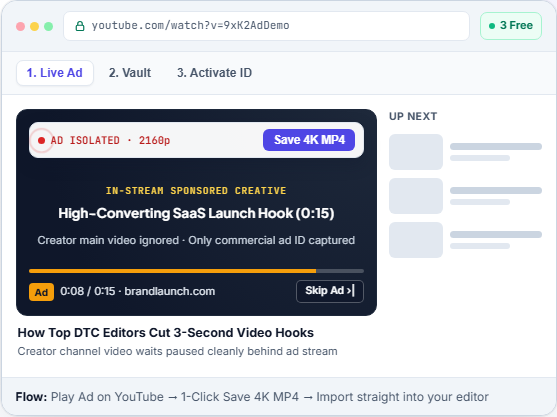
How Ad Inspiration Pro isolates only the commercial asset
- MAIN-world player inspection: Our lightweight content bridge (
injected.js) reads live YouTube player ad state transitions and commercial network ad beacons strictly inside the active tab. - 11-character
addocidverification: When an ad plays, it extracts the commercial's dedicated 11-character asset ID and explicitly cross-checks it against the organic creator video ID so main videos are strictly rejected. - Isolated Shadow DOM HUD: Only when a verified ad state is active does the floating HUD appear inside the player—staying visible even if you pause the ad to inspect a frame.
- Extension-only companion IPC: Your selection passes through the extension background worker (
background.js) to the local companion at127.0.0.1:49152using strict origin and header verification.
Why this matters for accurate swipe files
Because normal creator videos are ignored, your local Ad Inspiration folder stays 100% pure—filled strictly with commercial creatives rather than accidental 40-minute podcast downloads.
Try 3 Live 4K YouTube Ad Captures Free
Download the Windows companion (bundled FFmpeg) + Chrome extension and test 3 full-quality captures before picking Daily (₹29), Monthly (₹199), or 5-PC Agency plans.